Overview
Visual site builders and hand-written code sit at opposite ends, and both lose people. Builders lock your site into their platform and hide the code. Code editors expect you to already know HTML and CSS before you can change a heading colour.
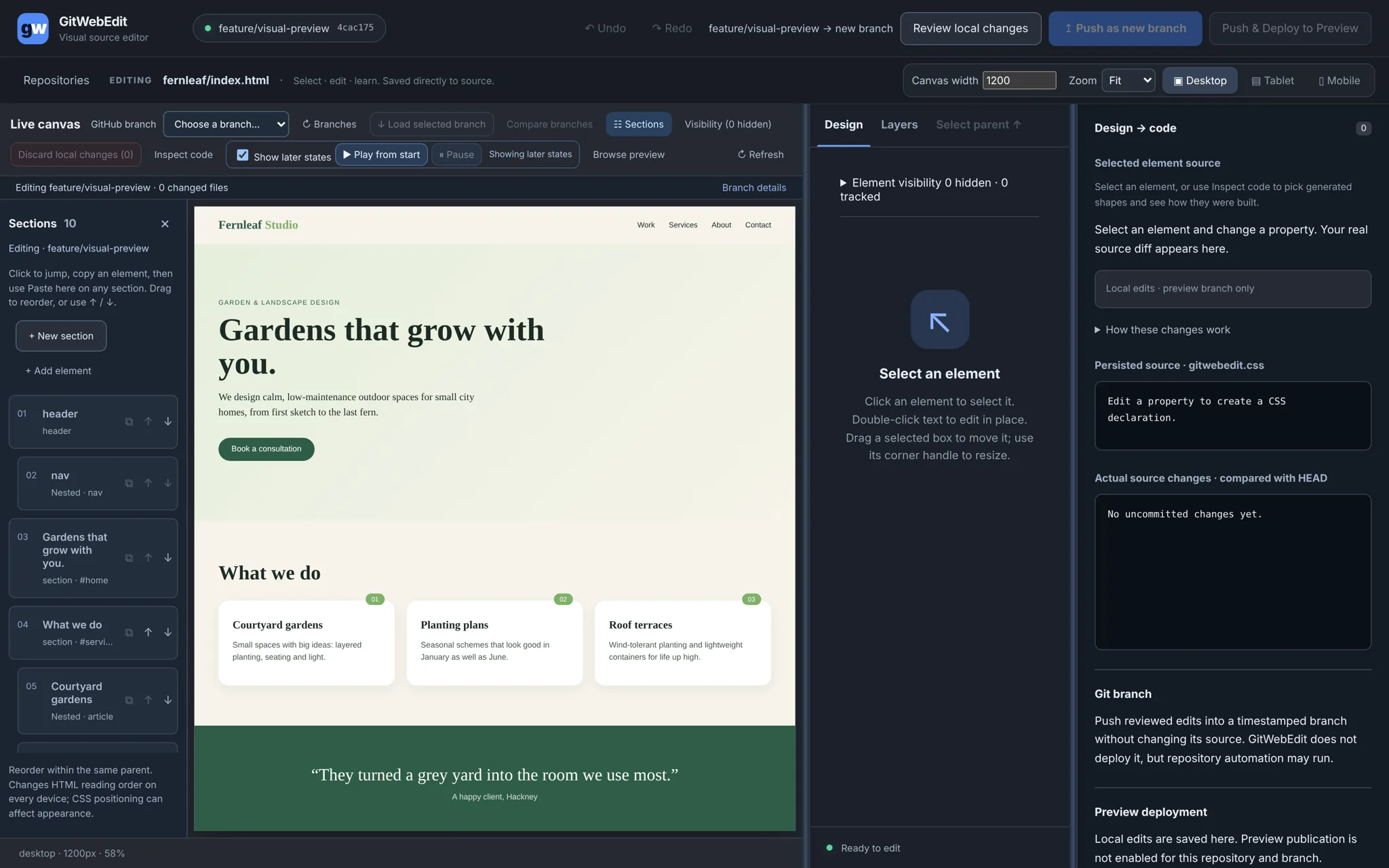
GitWebEdit is for people who own a real Git repository, like a clinic website or a small product site, but aren't full-time developers. You click and drag on the live page like in a design tool, and every change is written straight into the site's own HTML and CSS, shown beside the canvas, and pushed back as a branch you can review on GitHub.
- No lock-in. The output is the site's own files in its own repo.
- Learning by doing. Every visual change shows the CSS, source line and Git diff it produced.
- Safe by default. Editing never touches
mainor production. - Free and private. Runs on your own machine, no paid API, no LLM calls, no sign-up.
The first real user was the RALPH website and the RALPH Angular app, and those shaped most of the hard problems.
My role
Product definition, UX decisions, QA in my own environment and the safety rules, with the code written by AI coding agents under my direction.
Process
1. The canvas is the real site
The page runs with its own scripts and animations on a separate, sandboxed origin. Edits patch the live page without reloading it, so a playing animation or an open menu survives a colour change.

2. Code is always one glance away
The panel on the right shows the declaration you just wrote, the HTML line, matching CSS rules and the real Git diff. The explanations come from fixed rules, so they're always accurate and free.


3. Safety you can see
The top bar always names where a push will go. Every push opens a review of each change, with before and after values and a revert per change, and lands as a new timestamped branch, leaving the source branch untouched. When the editor can't prove an edit will behave as shown, it asks first or refuses.


4. Make it feel like a design tool
A full QA pass on real sites led to the biggest UX change: corner and edge handles, box and Cmd-click multi-select, group resize, zoom to fit, centring and native Cmd-Z undo. Layers and responsive editing followed.


5. Refined over four weeks
- 14 to 15 Oct. Prototype to live editor, with source teaching beside the canvas.
- 16 to 17 Oct. Releases 1 to 4: source integrity, change review, image catalogue, branch comparison, Angular adapter.
- 17 to 18 Oct. Precise picking of nested elements, animation controls, Layers.
- 22 to 23 Oct. Design-tool feel, after a full QA pass.
- 5 Nov. Safe GitHub refresh that never resets local work.
- 9 to 11 Nov. Source-first CSS: edit the site's own stylesheets directly and check the edit wins at desktop, tablet and mobile.
Early speed came from building features. Later quality came from saying no: fewer buttons, more guarantees.
Impact
A working editor used on a real static site and a real Angular app, with every change landing as a reviewable GitHub branch and nothing reaching production by accident.
What I learned: a canvas that shows something the code won't do is worse than a refusal with a clear reason. And strict rules (never touch main, never force-push, fictional data only) are what made it possible to move fast with AI agents.
Next: finish the design-tool backlog (snapping guides, space-drag panning, multi-select in Layers) and make the repo public under the MIT licence.