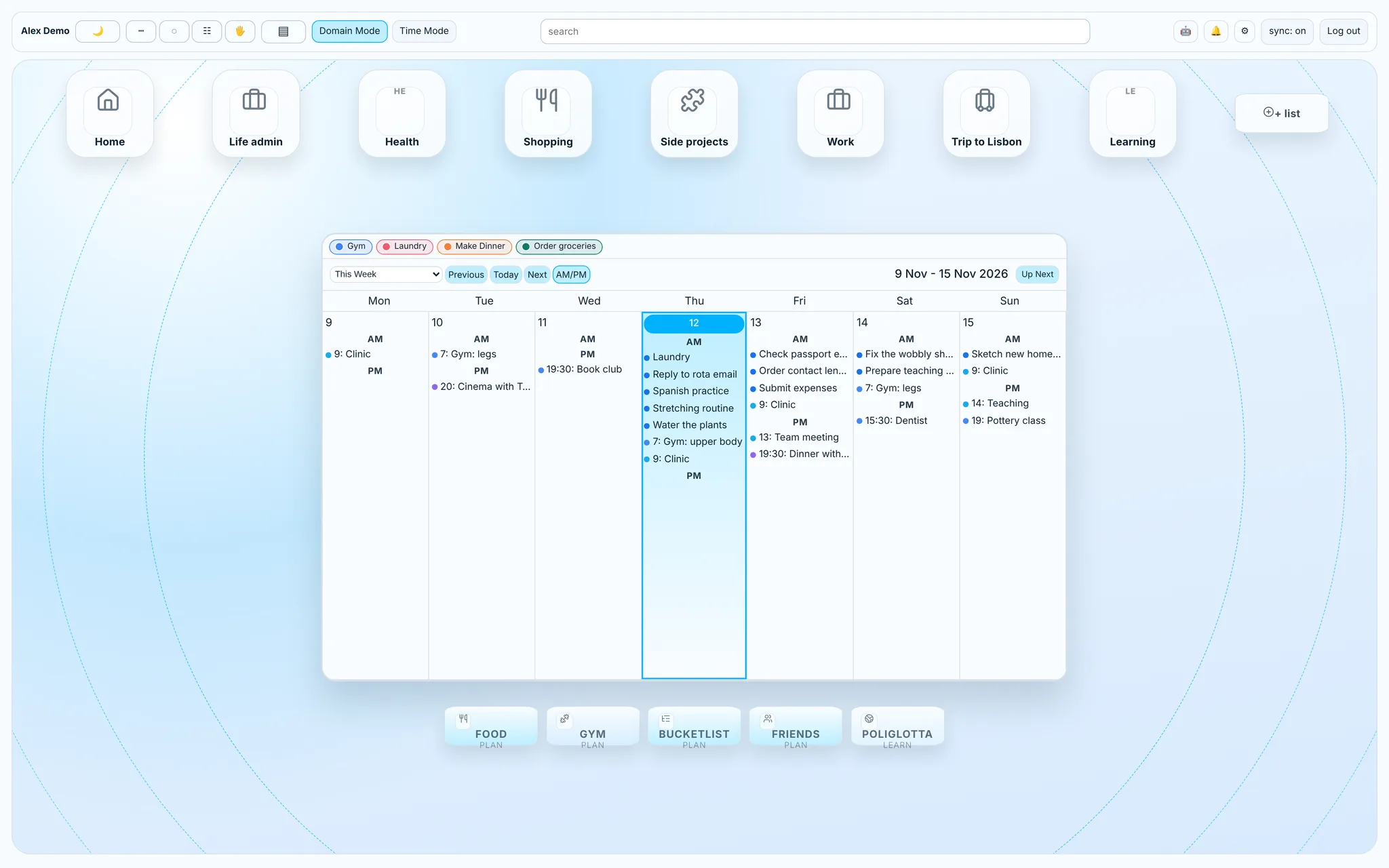
Overview
My calendar lived in one app, my tasks in another, workouts in a third, meal plans in a note and the friends I kept meaning to see in my head. Each tool was fine on its own. None of them knew about the others, so the actual planning happened in my head too.
LifePlan brings them together. Google Calendar and Google Tasks stay the source of truth, and everything else (gym, meals, friends, a bucketlist and language practice) sits around the same week, so a training session, a dinner plan and a friend's birthday show up where I'm already planning.
- One week view. Events, tasks and quick-add shortcuts on the same calendar.
- No duplicate systems. Tasks stay in Google, so nothing lives only in LifePlan.
- Built for daily use. An installed app on my phone and a planning canvas on desktop.
My role
Everything product-side: what to build, how it should work and look, and testing it on my own phone and desktop with my real data. The code was written with AI support, though I also manually refined snippets of code and styling.
Process
1. A canvas around the week
On desktop the calendar sits in the middle, task lists sit around it as tiles on a set of rings, and the bigger modules live in a dock underneath. Zoom moves the whole canvas so the calendar keeps its proportions, and lists can be grouped into small phone-style folders. Domain Mode keeps lists and accounts separate, while Time Mode merges them by when things are due.

2. Don't build a second task system
The most important decision was what not to build. Early versions had their own local tasks, which meant two places a task could live and two ways to lose one. I removed that: every actionable task is a Google task, and LifePlan only stores layout, extra metadata and an offline queue that syncs back when the connection returns. Several Google accounts can show side by side, but every edit goes to the account that owns the item.
3. Gym: from checklist to training log
The Gym section grew into the most developed part of the app, and it is designed mainly for the phone, since that is where it gets used. Workout templates (the plan) and dated sessions (what I actually did) are kept separate, so editing a template never rewrites history. Strength and cardio get different layouts: a lift needs reps and kilos, and a treadmill run needs minutes, distance and calories. It also has rest and set timers, comments that stay on their own session, and a history imported from two previous training apps.


That imported history turned out to be large enough to fill the browser's storage, which pushed sessions into their own database table. The newest addition, BioAnalysis, is an experimental tool for Olympic lifting videos. It estimates joint positions on the device, so the video never leaves the phone, and it's careful about what a 2D estimate can and can't tell you.
4. The rest of a week
Food plans the week's breakfasts, lunches and dinners from rules and ideas, and feeds both the shopping list and a smart Make Dinner shortcut. 'Friends' finds dates that work for both people from each calendar, with privacy being applied to each person's events or reasons for availability. It also sends (non-panicky) nudges when you haven't seen someone for a while.


A big part of my daily to-do whilst I was building it involved learning Spanish, which my Italian mother was also doing, so I built a specific tool that helps us native Italian speakers learn the false friends and words that commonly catch us out. Active recall is essential, so I built it with text input rather than multiple choice style questions.

The Bucketlist keeps longer-term plans out of the daily task list.

5. Mobile is its own app
On a phone, LifePlan switches to one pane per section. Installed as an app, it remembers which section you were in, which allows you to use it as multiple separate apps if you wish to. This allowed me to keep developing it freely, as a flexible desktop and mobile web-app, rather than committing to a version to submit for Apple verification.


6. AI with guard rails
LifePlan can export a structured, read-only snapshot (with a user-selected time range) of my tasks, calendar, meals and training for an external AI assistant. The assistant can send back proposed changes as JSON, which LifePlan checks, previews and lets me apply or undo one by one. This allows me to use AI optionally without deploying APIs, and always retain control of my data and what gets shared with AI.
Impact
LifePlan runs as an installed app on my phone and in the browser on desktop, with my real calendars, tasks and training history behind it.
What I learned: after building Lifeplan, I never bought an app again. I felt like I'd unlocked the power to build anything in exactly the way that addresses the frustration I have with products available on the market. For example, having to press play and pause on a pause timer during a workout added friction for me. I would forget to do it. My app starts the timer the second I've logged the last set, and I can pause it manually or, if I just log the next set, it automatically stops the timer AND detracts the time it calculates that it would have taken me to do so (different exercises have different rep duration).