Overview
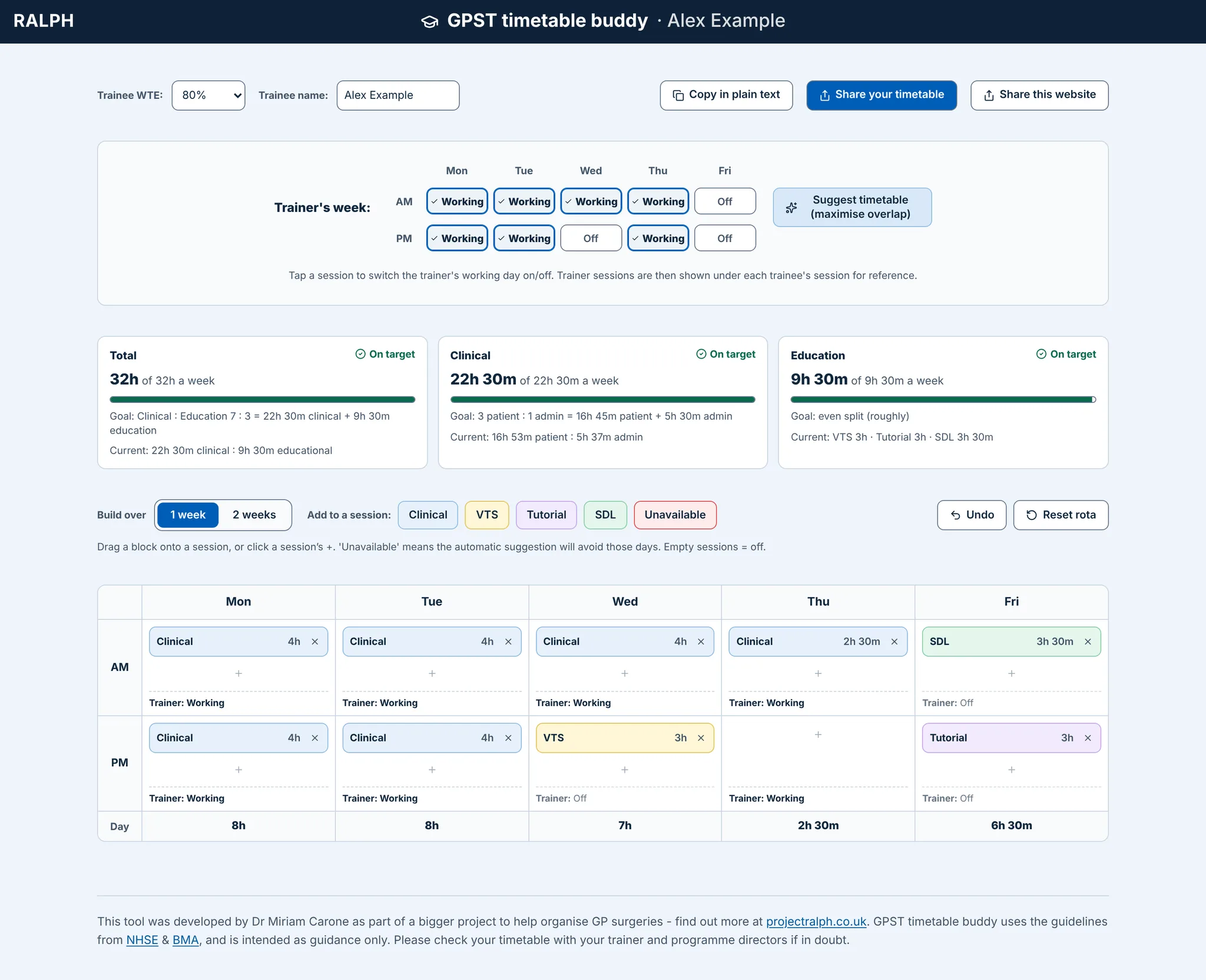
A GP trainee's weekly timetable is notoriously difficult to decide on: 70% clinical and 30% education, patient surgery to admin at 3:1, a fixed VTS half day, tutorials and self-directed learning (SDL), all scaled by WTE. It also has to line up with the trainer's days, as far as reasonably possible. Trainees and trainers usually sort this out in a spreadsheet or a long email thread.
The tool answers two questions: does my week meet the guidance, and does it overlap with my trainer?
It is part of the RALPH family of free tools, alongside the GP Appraisal Buddy. Try it live.
Process
1. Starting from RALPH
RALPH already had a trainee timetable builder. I took its model (WTE targets, hours maths, suggestion logic) and rewrote the interface as a standalone app with no database of people and no sign-in.

2. Live feedback while you build
Three meters (Total, Clinical, Education) show hours against the WTE target, with plain statuses such as "4h to place" and "On target". The hours are guidance only and never a hard limit.
You pick an activity (Clinical, VTS, Tutorial, SDL, Unavailable), then tap a half day or drag it there. Each half day opens a small editor for type and length in 15-minute steps. Faint tints tell activities apart: blue clinical, yellow VTS, purple tutorial, green SDL.


3. The trainer's week beside the trainee's
The trainer's working days are picked by hand (Working or Off), so no practice data is ever needed. Each session then shows "Trainer: Working" or "Trainer: Off". "Suggest timetable" proposes a week that maximises overlap and avoids the trainee's Unavailable half days, which turns a spreadsheet chore into one click.
4. Sharing without accounts
"Share your timetable" saves a snapshot at an unguessable link. Every save makes a new link, so a trainer's copy can't change under them. A new link shows what changed against the one before (Added and Removed pills, with Hide changes), which makes feedback rounds between trainee and trainer easy to follow. "Copy in plain text" and "Share this website" cover the other cases.

The main RALPH app can also open the tool with a trainee's WTE and sessions already filled in. That data travels in the address fragment, so the browser never sends it to a server.
5. Designing by subtraction
I reviewed it in rounds, and most changes removed things that added unnecessary steps and/or crowded the UI. I made the mobile version slightly different, because I knew that although a desktop is a much better place to organise a weekly timetable, most people would still be opening the link on their mobile from a WhatsApp or email link share.
6. Small design rules
- Same blue banner, type and tokens as RALPH. It reads as one family, and trainees may later move to RALPH.
- A wrapping layout with no horizontal scroll. Works from 390px phones to wide desktops.
- + buttons on phones. Drag is unreliable on touch screens.
- Short labels on phones ("Copy text", "Share link"). Keeps the action row on one line.
- Guidance only. The footer sends people back to their trainer and programme director.

7. Building it
Angular 21 (zoneless, standalone components) with no UI library, about 2,600 lines including tests. The share API runs on Cloudflare Pages Functions and a D1 database on the free plan. Links use 128-bit random ids, there is no list endpoint, payloads are capped and rebuilt from known fields only, and links unused for 90 days are deleted. I tested it in a real browser against a local database on the real path, as well as with unit tests.
Impact
The tool tracks nothing about its users, by design, so there are no usage numbers yet.
Developed by Dr Miriam Carone, part of RALPH.